ช่วงหลังมานี้ผมใช้ AI coding agent แทบทุกวัน ไม่ว่าจะเป็นตอนเขียนสคริปต์ประมวลผลข้อมูล GIS หรือช่วยดีบักโค้ดโปรเจกต์ต่าง ๆ แต่ปัญหาที่เจอบ่อยที่สุดไม่ใช่ความสามารถของโมเดล แต่คือ token หมดเร็วกว่าที่คิด โดยเฉพาะตอนใช้งานผ่าน Antigravity ที่บางทีทำงานไปได้ไม่กี่รอบก็ชนลิมิตแล้ว ต้องรอ reset หรือสลับไปใช้โมเดลอื่นแทน
พอดีไปเจอโปรเจกต์ tokless ของ HoangP8 เข้า เลยลองติดตั้งดูกับงานที่ทำอยู่ประจำ แล้วก็พบว่ามันช่วยได้จริง งานปริมาณเท่าเดิม แต่ token ใช้ไปน้อยลง ทำให้ใช้งานต่อได้นานขึ้นอย่างเห็นได้ชัด แต่ก่อนจะพูดถึง tokless มีอีกเรื่องพื้นฐานที่อยากชวนคิดก่อน นั่นคือการเลือกโมเดลให้ถูกกับงาน ซึ่งส่งผลต่อค่าใช้จ่าย/quota มากกว่าที่หลายคนคิด บทความนี้เลยจะเล่าทั้งสองเรื่อง เริ่มเลยละกัน!
ทำไม token ถึงหมดเร็ว
ปัญหาที่คนใช้ AI coding agentเจอบ่อย ๆ คือ context ที่ป้อนเข้าโมเดลในแต่ละรอบมันบวมเกินความจำเป็น เช่น
- รัน command แล้ว output ยาวเป็นหน้ากระดาษ ทั้งที่ AI ต้องการแค่บรรทัดสองบรรทัด
- ให้ AI อ่านทั้งไฟล์เพื่อหาแค่ฟังก์ชันเดียว
- คำตอบของ AI เองก็ยืดยาว อธิบายเกินความจำเป็น
- งานที่ต้องประมวลผลข้อมูลเยอะ ๆ แล้ว AI ต้องอ่านผลลัพธ์ดิบทั้งหมดกลับเข้า context
ทุกจุดนี้คือ token ที่ถูกใช้ไปแบบไม่จำเป็น สะสมไปเรื่อย ๆ ต่อการสนทนาหนึ่งครั้งก็หมดเร็วกว่าที่ควร
ก่อนอื่น: เลือกโมเดลให้ถูกกับงานก่อน
มีอีกเรื่องที่อยากพูดถึงก่อนจะไปถึง tokless เพราะเป็นสิ่งที่ช่วยประหยัดได้เยอะกว่า และควรทำเป็นอันดับแรก นั่นคือเลือกโมเดลให้เหมาะกับขนาดงาน ไม่ใช่เปิดโมเดลรุ่นท็อปสุดไว้ใช้ทุกงานตลอดเวลา
หลายคน (รวมถึงผมเองในอดีต) ติดนิสัยเปิดโมเดลที่แรงที่สุดค้างไว้ ทั้งที่งานที่ทำอยู่แค่แก้ typo, เขียน docstring, หรือรีแฟกเตอร์โค้ดเล็ก ๆ ที่โมเดลรุ่นเล็กกว่าก็ทำได้สบาย ๆ ปัญหาคือราคาต่อ token ระหว่างโมเดลรุ่นท็อปกับรุ่นเล็กมันต่างกันหลายเท่าตัว ไม่ใช่ต่างกันนิดหน่อย
ลองดูตัวอย่างราคาต่อ 1 ล้าน token (อ้างอิงจากหน้าราคาทางการ ณ ตอนที่เขียนบทความนี้ — ราคาจริงเปลี่ยนแปลงได้ตลอด ควรเช็กหน้าราคาล่าสุดก่อนตัดสินใจ):
| ฝั่ง |
โมเดล |
Input / 1M token |
Output / 1M token |
| Anthropic |
Claude Opus 5 (รุ่นท็อป) |
$5 |
$25 |
| Anthropic |
Claude Sonnet 5 (รุ่นกลาง) |
$2 |
$10 |
| Anthropic |
Claude Haiku 4.5 (รุ่นเล็ก) |
$1 |
$5 |
| OpenAI |
GPT-6 Astra (รุ่นท็อป) |
$10 |
$50 |
| OpenAI |
GPT-5.6 Luna (รุ่นเล็ก) |
$0.20 |
$1.20 |
จะเห็นว่าแค่ในฝั่ง Anthropic โมเดลท็อปสุดกับรุ่นเล็กสุดต่างกันถึง 5 เท่า ทั้งฝั่ง input และ output ส่วนฝั่ง OpenAI ยิ่งชัดกว่านั้น รุ่นท็อปกับรุ่นเล็กต่างกันถึง ~40–50 เท่า งานปริมาณเท่ากันเป๊ะ แต่ค่าใช้จ่าย (หรือ quota ที่โดนหักไป) ต่างกันคนละเรื่องเลย
เพราะฉะนั้นก่อนจะไปหาเครื่องมือมาช่วยประหยัด token ให้ถามตัวเองก่อนว่า งานตรงหน้าจำเป็นต้องใช้โมเดลรุ่นท็อปจริงไหม ถ้าเป็นโปรเจกต์ใหญ่ ซับซ้อน ต้องวางแผนสถาปัตยกรรม หรือดีบักบั๊กหิน ๆ ค่อยสลับไปโมเดลรุ่นท็อป แต่ถ้าเป็นงานเล็ก ๆ ทั่วไป งานซ้ำ ๆ ที่ไม่ต้องคิดเยอะ ใช้โมเดลรุ่นรองหรือรุ่นเล็กก็เพียงพอ และยังทำให้ quota/เครดิตที่มีอยู่ใช้ได้นานขึ้นมากด้วย
พอเลือกโมเดลให้เหมาะกับงานแล้ว ค่อยเติม tokless เข้าไปเป็นชั้นที่สอง เพื่อลด token ที่ยังรั่วไหลอยู่ในแต่ละคำขอให้น้อยลงไปอีก สองอย่างนี้ทำงานคนละชั้นกัน ใช้ร่วมกันได้เต็มที่ ไม่ทับซ้อนกัน
tokless คืออะไร
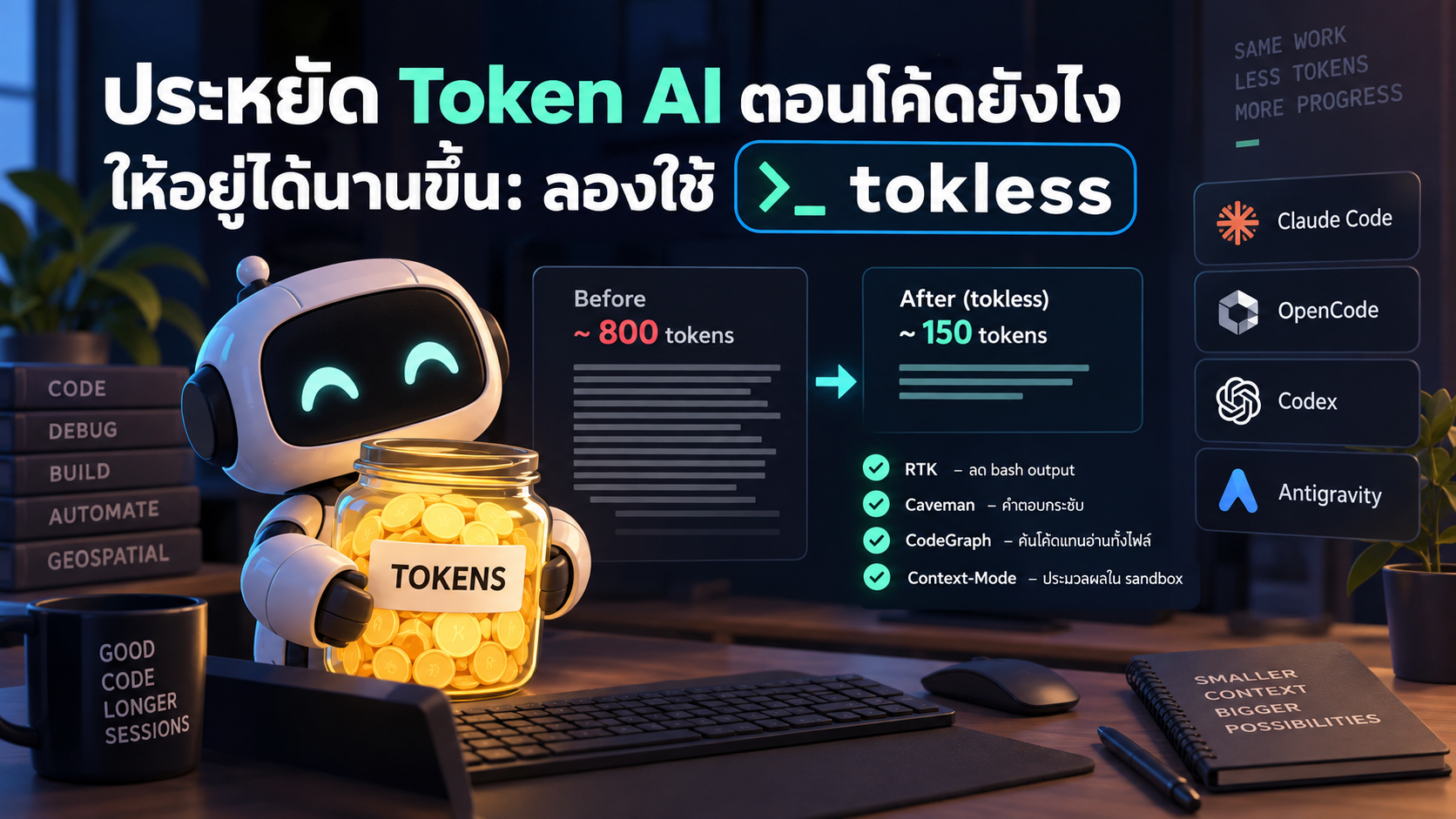
tokless เป็นเครื่องมือ CLI ตัวเดียวที่รวมปลั๊กอินประหยัด token ไว้ 4 ตัว ครอบคลุมจุดที่ token รั่วไหลบ่อยที่สุด และรองรับ agent หลักอย่าง Claude Code, OpenCode, Codex และ Antigravity
- RTK — กรอง output จาก bash/tool ที่รก ๆ ออกก่อนส่งให้โมเดล ใน README ยกตัวอย่างว่า output ยาว 45 บรรทัด (~800 token) ถูกย่อเหลือ 12 บรรทัด (~150 token)
- Caveman — บังคับให้ AI ตอบแบบกระชับ ตรงประเด็น ไม่อารัมภบทยาว ตัวอย่างจาก README คือคำอธิบายที่เคยใช้ 69 token ลดเหลือ 19 token
- CodeGraph — ให้ AI ค้น code graph เพื่อหาสิ่งที่ต้องการ แทนที่จะเปิดอ่านทั้งไฟล์
- Context-Mode — งานที่ต้องประมวลผลข้อมูลหนัก ๆ จะถูกรันใน sandbox แล้วส่งกลับมาแค่ผลลัพธ์ที่เกี่ยวข้อง ไม่ใช่ข้อมูลดิบทั้งก้อน
จุดที่ผมชอบคือมันไม่ได้บังคับให้เปลี่ยนวิธีทำงาน แค่ติดตั้งครั้งเดียวแล้วปลั๊กอินทั้ง 4 ตัวก็ทำงานอยู่เบื้องหลังของ agent ที่เราใช้อยู่แล้ว
ผลจากการลองใช้จริง
ผมลองเทียบงานลักษณะเดิม ๆ ที่ทำประจำ (เขียน/แก้โค้ด รันคำสั่งตรวจสอบผลลัพธ์ ให้ AI อธิบายโค้ด) ทั้งแบบติดตั้ง tokless และไม่ได้ติดตั้ง บน Antigravity เป็นหลัก สิ่งที่สังเกตได้ชัดคือ session เดียวกันใช้งานได้นานขึ้นกว่าเดิมพอสมควรก่อนที่ token จะหมดหรือชนลิมิต ทั้งที่ปริมาณงานที่ทำเสร็จใกล้เคียงกัน พูดง่าย ๆ คือได้งานเท่าเดิมแต่จ่าย token น้อยลง ซึ่งก็สอดคล้องกับตัวเลขตัวอย่างที่ทาง tokless แสดงไว้ใน README (ลด bash output ได้ราว 81% และลดความยาวคำตอบได้ราว 72% ในกรณีตัวอย่างของเขา)
ผมยังไม่ได้ทำ benchmark แบบเป็นระบบ (จำนวนรอบงาน/จำนวน token ที่วัดแม่นยำ) แต่จากการใช้งานจริงหน้างานทุกวัน ก็รู้สึกได้ถึงความต่างชัดเจนพอที่จะแนะนำให้ลองกัน
วิธีติดตั้ง
macOS / Linux
bash
curl -fsSL https://raw.githubusercontent.com/HoangP8/tokless/main/scripts/install.sh | bash
Windows
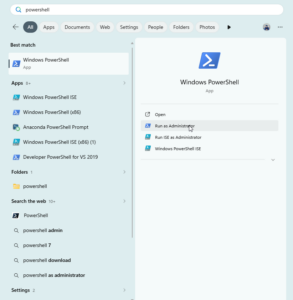
พิมพ์ Powershell ที่ Start Menu แล้วคลิ๊กที่ Run as Administrator
จากนั้น Copy Code ข้างล่างนี้วางในหน้าจอของ Powershell
irm https://raw.githubusercontent.com/HoangP8/tokless/main/scripts/install.ps1 | iex 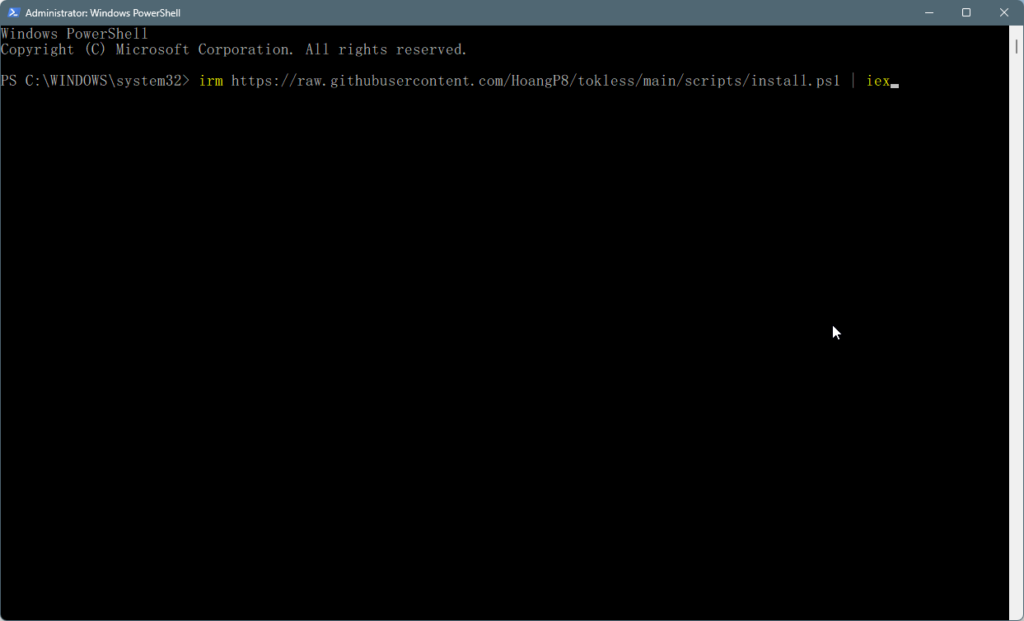
กด Enter จะรันคำสั่ง tokless จะเข้าสู่โหมด interactive setup ให้เลือกว่าจะติดตั้งปลั๊กอินตัวไหนบ้าง และเลือก agent ที่ต้องการเปิดใช้งาน (เช่น Claude Code, OpenCode, Codex, Antigravity)
ถ้าต้องการติดตั้งเฉพาะบาง agent สามารถระบุผ่าน flag ได้ เช่น
bash
tokless --agents claude,antigravity
อยากดูก่อนว่าจะมีอะไรเปลี่ยนแปลงบ้างโดยยังไม่ install จริง ใช้
bash
tokless --dry-run --verbose
คำสั่งที่ใช้บ่อยหลังติดตั้ง
ตรวจสอบสถานะการตั้งค่าปัจจุบัน ว่าปลั๊กอินไหนเปิดอยู่บ้าง มีปัญหาอะไรไหม
bash
tokless doctor 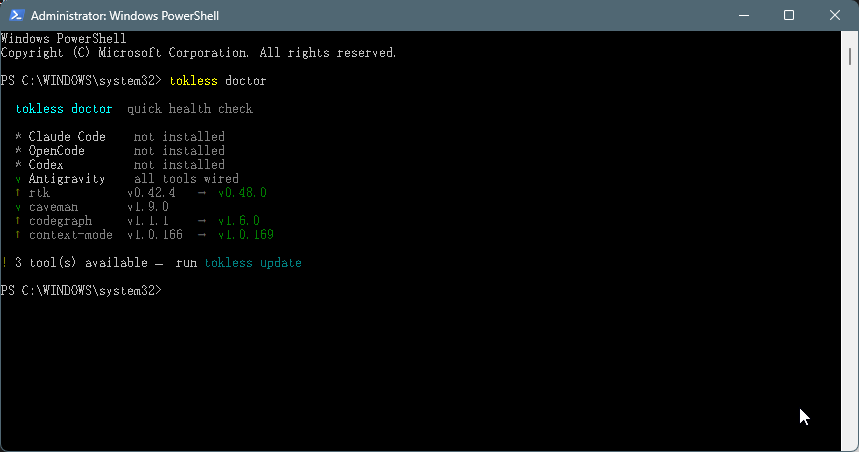
อัปเดตปลั๊กอินเป็นเวอร์ชันล่าสุด พร้อม diff ให้ดูก่อนว่าเปลี่ยนอะไรบ้าง
bash
tokless update 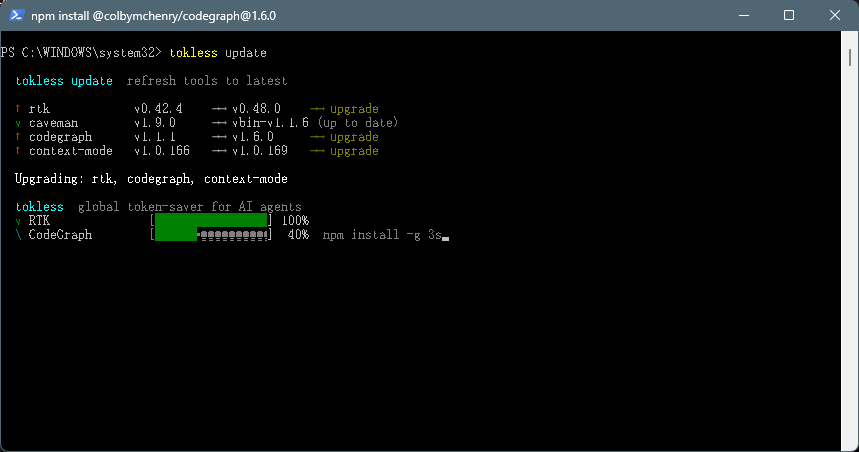
ถ้าอยากถอนการติดตั้งทั้งหมด
สรุป
ถ้าใครใช้ AI coding agent เป็นประจำแล้วรู้สึกว่า token หมดเร็วเกินไป โดยเฉพาะช่วงนี้ที่ Antigravity ได้รับความนิยมสูง แนะนำให้ทำสองอย่างนี้ควบกัน
- เลือกโมเดลให้เหมาะกับงานก่อน — งานเล็ก งานซ้ำ ๆ ใช้โมเดลรุ่นรอง/รุ่นเล็กพอ เก็บโมเดลรุ่นท็อปไว้สำหรับงานที่ต้องคิดเยอะจริง ๆ แค่นี้ก็ประหยัดไปได้หลายเท่าตัวแล้วจากส่วนต่างราคาที่คุยไปข้างต้น
- ติดตั้ง tokless เพิ่มเข้าไป เพื่อลด token ที่รั่วไหลในแต่ละคำขอ ไม่ว่าจะใช้โมเดลรุ่นไหนอยู่ก็ตาม
ใช้เวลาติดตั้งไม่กี่นาที ไม่ต้องเปลี่ยนวิธีทำงานเดิม แต่ช่วยให้ session การทำงานยืดออกไปได้อีกพอสมควร จากที่ลองใช้เองพบว่าทำงานปริมาณเท่าเดิม แต่ token เหลือใช้มากกว่าเดิมชัดเจน
ใครลองแล้วผลเป็นยังไงมาแชร์กันได้เลยครับ
อ้างอิง
ราคาโมเดลข้างต้นเป็นราคา ณ ตอนที่เขียนบทความ (กันยายน 2569) ผู้ให้บริการมักปรับราคา/ออกโมเดลใหม่อยู่เรื่อย ๆ แนะนำให้เช็กหน้าราคาทางการอีกครั้งก่อนใช้ตัดสินใจจริง
Lately I use an AI coding agent almost every day — writing GIS data-processing scripts, debugging code across different projects, that sort of thing. The problem I keep running into isn’t the model’s capability, it’s that tokens run out faster than expected, especially on Antigravity, where sometimes just a few rounds of work is enough to hit the limit and force a reset or a switch to a different model.
I recently came across a project called tokless by HoangP8, so I tried installing it alongside my usual workflow, and it genuinely helped: the same amount of work used noticeably fewer tokens, letting a session run longer before running dry. But before getting into tokless, there’s a more basic thing worth thinking about first — choosing the right model for the job — which affects cost/quota far more than most people realize. So this post covers both: picking the right model, then what tokless is, how it works, and how to install it.
Why tokens run out so fast
A common issue for anyone using an AI coding agent is that the context fed into the model each turn balloons far beyond what’s actually needed. For example:
- Running a command that dumps a page of output, when the AI only needs a line or two of it
- Having the AI read an entire file just to find one function
- The AI’s own replies running long, over-explaining things that don’t need it
- Heavy data-processing tasks where the AI has to pull the full raw output back into context
Every one of these burns tokens unnecessarily, and it adds up fast within a single conversation.
First things first: pick the right model for the job
There’s something worth addressing before tokless, because it saves even more, and it should be step one: matching the model to the size of the task, rather than leaving the top-tier model running for everything.
A lot of people (myself included, in the past) get into the habit of leaving the most powerful model on at all times, even for work that’s just fixing a typo, writing a docstring, or a small refactor — the kind of thing a smaller model handles just fine. The catch is that the per-token price gap between top-tier and smaller models isn’t a small difference — it’s often several times over.
Here’s a price comparison per 1M tokens (based on official pricing pages at the time of writing — prices change often, so check the latest pricing page before relying on this):
| Provider |
Model |
Input / 1M tokens |
Output / 1M tokens |
| Anthropic |
Claude Opus 5 (top-tier) |
$5 |
$25 |
| Anthropic |
Claude Sonnet 5 (mid-tier) |
$2 |
$10 |
| Anthropic |
Claude Haiku 4.5 (small) |
$1 |
$5 |
| OpenAI |
GPT-6 Astra (top-tier) |
$10 |
$50 |
| OpenAI |
GPT-5.6 Luna (small) |
$0.20 |
$1.20 |
On the Anthropic side alone, the gap between the top-tier and smallest model is about 5x on both input and output. On the OpenAI side it’s even starker — roughly 40–50x between the flagship and the small model. Same amount of work completed, but the cost (or quota burned) is in a completely different league.
So before reaching for a tool to save tokens, ask yourself first: does this task actually need the top-tier model? If it’s a large, complex project — architecture planning, gnarly debugging — switch to the top-tier model. But for small, routine, repetitive tasks that don’t need heavy reasoning, a mid-tier or small model is enough, and it makes your existing quota/credits last a lot longer.
Once you’ve matched the model to the task, add tokless as a second layer, to cut down on the tokens still leaking out of each individual request. The two work at different layers and stack cleanly — no overlap.
What is tokless
tokless is a single CLI tool that bundles four token-saving plugins covering the most common places tokens get wasted, and it supports the major agents: Claude Code, OpenCode, Codex, and Antigravity.
- RTK — filters noisy bash/tool output before it reaches the model. The README gives an example of 45 lines (~800 tokens) of output trimmed down to 12 lines (~150 tokens).
- Caveman — nudges the AI toward terse, to-the-point replies instead of long preambles. The README’s example shows an explanation that used to take 69 tokens cut down to 19.
- CodeGraph — lets the agent query a code graph to find what it needs, instead of reading whole files.
- Context-Mode — runs heavy data-processing work in a sandbox and returns only the relevant results, not the full raw output.
What I like about it is that it doesn’t force you to change how you work — install it once, and all four plugins run in the background of whichever agent you’re already using.
What I found in practice
I compared my usual kind of work (writing/fixing code, running commands to check results, having the AI explain code) with and without tokless installed, mainly on Antigravity. What stood out clearly was that the same session lasted noticeably longer before running out of tokens or hitting the limit, while completing a similar amount of work. In short: same output, fewer tokens spent — which lines up with the example numbers tokless shows in its own README (about an 81% reduction in bash output and about a 72% reduction in reply length, in their example case).
I haven’t run a rigorous benchmark (exact token counts across a fixed number of tasks), but from day-to-day real use, the difference was clear enough that I’d recommend giving it a try.
Installation
macOS / Linux
bash
curl -fsSL https://raw.githubusercontent.com/HoangP8/tokless/main/scripts/install.sh | bash
Windows (PowerShell)
powershell
irm https://raw.githubusercontent.com/HoangP8/tokless/main/scripts/install.ps1 | iex
Running tokless on its own launches an interactive setup where you pick which plugins to install and which agents to enable them for (e.g. Claude Code, OpenCode, Codex, Antigravity).
To install for specific agents only, pass a flag:
bash
tokless --agents claude,antigravity
To preview what would change without actually installing:
bash
tokless --dry-run --verbose
Commands you’ll use often after installing
Check the current configuration status — which plugins are active, and whether anything’s wrong:
Update plugins to the latest version, with a diff preview of what’s changing:
To remove everything:
Wrapping up
If you use an AI coding agent regularly and feel like tokens run out too fast — especially now that Antigravity has gotten so popular — do these two things together:
- Pick the right model for the job first — small, repetitive tasks only need a mid-tier or small model; save the top-tier model for work that genuinely requires heavy reasoning. This alone can save you several times over, based on the price gaps above.
- Add tokless on top to cut down on the tokens leaking out of each request, regardless of which model you’re running.
It takes only a few minutes to install, doesn’t require changing how you work, and lets a session run noticeably longer. In my own use, I got the same amount of work done while burning through noticeably fewer tokens.
If you try it, I’d love to hear how it goes.
References
Model prices above are as of the time of writing (September 2026). Providers frequently adjust pricing and release new models, so check the official pricing pages again before relying on these figures.